
I Trained Claude Code How to Write Like Me
How one CLAUDE file turned 3-4 hour articles into 20-minute outputs

Last month I was spending 3-4 hours on every newsletter article. I was exhausted. I wanted to publish twice a week—Tuesdays AND Thursdays—but at that pace, I’d burn out before February.
So I built a system. One prompt. Eight deliverables. My voice.
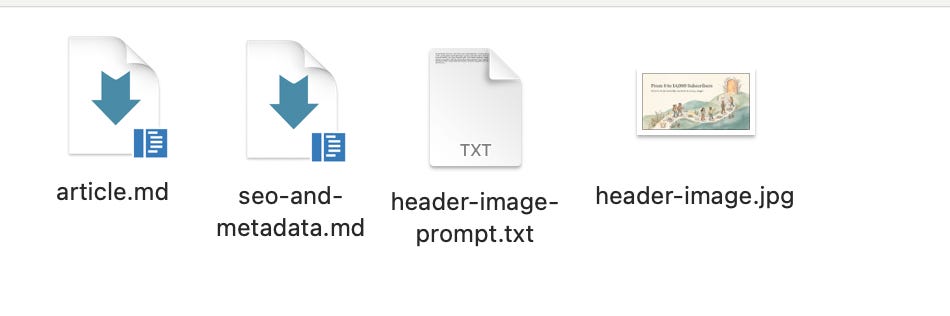
I gave Claude Code a single topic and it generated everything: headline, subtitle, SEO summary, header image prompt, the full article with all my CTAs, a Notes teaser, and three email subject line options. All in my writing style.
Here’s exactly how I set it up.
Learn from AI experts in Cozora

I co-founded Cozora. It’s THE AI learning community for people who want to stay on top of AI.
We built Cozora to solve a problem we all share: too much AI information, not enough implementation. Instead of static courses, you get live weekly sessions where experts show you their actual workflows in real-time.
If you’re a premium subscriber to Level Up with AI or Wander Wealth, you get 50% off. That’s $360/year saved. Join me and I’ll send you the code right away.
The Problem with Generic AI Writing
We’ve all been there. You paste your newsletter draft into ChatGPT and get back something that sounds like... everyone else. Corporate. Flat. Missing your personality.
That’s because AI doesn’t know your voice until you teach it.
The difference between AI that sounds generic and AI that sounds like you comes down to one thing: context. Specifically, showing it how you actually write, not telling it to “be conversational” or “sound friendly.”
I discovered Claude Code has a feature that changes everything. It automatically reads a file called CLAUDE.md in your project folder. Whatever instructions you put in that file, Claude follows every single time.
So I turned that file into my writing bible.
The Setup: What You Need
Here’s the folder structure I created:
Substack_ClaudeCode/
├── CLAUDE.md ← The style guide
└── LevelUpwithAI_BackUp/ ← My Substack export
└── posts/ ← All my past posts as HTML
That’s it.
Two things: a style guide and your past writing.
Step 1: Export your posts from Substack
Go to Substack Settings → Export → Download your archive. You’ll get a zip file with all your posts as HTML files. Drop that folder into your Claude Code project folder.
Step 2: Create the CLAUDE.md file
This is where the magic happens. The file tells Claude:
1. To analyze 5-10 of your past posts before writing anything
2. Your voice rules (what you do and don’t do)
3. Your signature phrases
4. The exact output format you want
5. Your brand colors for image prompts
6. Your CTA templates ready to copy-paste
Here’s what I put in mine:
# FIRST RUN: Analyze Past Posts
Before writing anything, analyze 5-10 posts from /posts/
Extract:
- How I open posts (my hooks)
- Sentence length patterns
- How I transition between sections
- Words/phrases I use often
- Words/phrases I avoid
Use these patterns in everything you generate.
Then I added my voice rules:
VOICE RULES

Always Do:

- Start with a real moment, not a generic statement
- Use specific numbers (”884 subscribers” not “hundreds”)
- Mix sentence lengths
- Write like talking to a friend
- Show vulnerability - what didn’t work

Never Do:

- Rhetorical questions as hooks
- Corporate jargon
- Passive voice when active works
- Generic advice without personal experience
And my signature phrases:
My Signature Phrases:

- “Let’s dive in.”
- “Here’s the thing...”
- “Quick tip:”

Phrases to Avoid:

- “In today’s newsletter...”
- “Game-changer”
- “Revolutionary”
Step 3: Define the output format
This is the key insight. I told Claude exactly what I wanted back:
SINGLE PROMPT → COMPLETE OUTPUT

Generate ALL of the following in one response:

1. HEADLINE (5-10 words, specific)
2. SUBTITLE (under 100 characters)
3. SEO SUMMARY (150-160 characters)
4. GPT/AI SEARCH OPTIMIZATION (keywords + FAQ)
5. HEADER IMAGE PROMPT (with my brand colors)
6. FULL ARTICLE (with structure template)
7. SUBSTACK NOTES TEASER (under 280 characters)
8. EMAIL SUBJECT LINE OPTIONS (3 options)
I also included my exact article structure: personal hook, setup, main content formats, takeaway, engagement hook, and CTA section with templates ready to paste.
The Workflow in Action
Now when I want to write an article, here’s what I do:
1. Open Terminal
2. Navigate to my folder: `cd Substack_ClaudeCode`
3. Type: `claude`
4. Give it a prompt like this:
Write an article about how I built a Chrome extension with Claude in 30 minutes with no coding experience. Personal angle: I paid $1,000 to have one built last year.
Last week I built one myself for free...
Claude Code reads my CLAUDE.md file automatically. It analyzes my past posts. Then it generates all eight deliverables in one response.
The first time I ran this, I almost didn’t believe it. The article sounded like me. Not perfect—I still edit—but 80% there. The headline options were better than what I usually come up with on my own.
What the CLAUDE.md File Actually Contains
Here’s a breakdown of the key sections in my 400-line style guide:
Voice extraction instructions: Tells Claude to read my past posts and identify patterns before writing anything.
Output format: Specifies exactly what I want: headline, subtitle, SEO, image prompt, article, Notes teaser, subject lines. All in one response.
Article structure template: Personal hook (3-5 lines), setup (2-3 paragraphs), main content with format options (numbered list, story + lesson, framework, or tool breakdown), takeaway, engagement hook, and CTAs.
Brand colors: My hex codes for image prompts so every header looks consistent.
Signature phrases and anti-patterns: What I say, what I never say.
CTA templates: Ready to copy-paste so I don’t have to rewrite them every time.
Quick tip: The more specific your CLAUDE.md file, the better the output. Don’t just say “be conversational.” Show examples. Include actual phrases. Reference real posts.
The Results
Before this system: 3-4 hours per article, publishing once a week, constantly exhausted.
After: 20-30 minutes to generate a draft, another 30-40 to edit and polish. I now publish Tuesdays AND Thursdays for Wander Wealth. And Wednesdays for Level up with AI.
That’s not twice the work. It’s maybe 60% of what I was doing before for double the output.
The image prompts alone save me an hour. I used to struggle with what to tell Midjourney or Gemini. Now Claude generates prompts that match my brand colors and style every time AND generates the image matching the article automatically.
Here my first article from this week written with this set-up.
Your Next Step
You don’t need my exact CLAUDE.md file. You need one built for YOUR voice.
Start here:
1. Export your Substack posts (Settings → Export)
2. Create a folder with your export and a blank CLAUDE.md file
3. Add voice rules based on how YOU write
4. Define the output format you want
5. Run `claude` in that folder and give it a topic
The first version won’t be perfect. Mine wasn’t. But after 3-4 iterations of refining the CLAUDE.md file, I had something that actually sounds like me.
I’m Curious...
Your answer really helps. I’m building more workflows based on what you’re struggling with.
Was this helpful?
If you found this helpful, please share it with someone who’s trying to figure out AI.
Want to go deeper with AI?
As a paid subscriber, you get my direct feedback on your AI setup + 50% off Cozora, the AI learning community I co-founded.
Every week, AI experts join us live to show exactly how they’re using AI right now. Don’t get left behind. Learn AI with others who are actually building things.
Woah this is exactly what I was looking for.. I prefer Claude over ChatGPT for writing. Usually I use it when I'm stuck. I feed it my outline and ask to expand, then course correct from there. This is so much more thorough. Appreciate it!
I follow a different approach:
- I write my articles in Markdown (which is a text format) and copy paste that into Substack. This way the formatting is already done. I don't have to style my articles in the Substack app. And I save my markdown files directly on my laptop so I can save context compared to HTML files
- instead of a CLAUDE.md, I use Claude skills so that I have larger context that can loaded on demand for the different phases of writing an article. Say that I write my draft first, I can later ask to only rewrite my SEO description or change the conclusion of the article without loading again a large CLAUDE.md context but only the parts of the context that are necessary for my goal
Same outcome, different ways to achieve that. More flexibility and lower LLM cost